Hey there, I’m Eeshan. I write about local AI, data science, and how to use AI, with a bias towards human-centric approaches to working with new technologies. You can find some of my interesting side projects at eeshans.com.
This article is part of my local AI series, where I’ve been tracking local AI models’ readiness and usefulness on modern laptops.
#1: It’s time for the regular person to start testing local AI models
#3: Testing local AI models by asking them to build Cherry Blossoms and Solar Systems
#4: Testing local AI models by asking them to analyze a real A/B test
In Series #5, I mentioned a tool I’d been working on called minimal-ai. I’ve tinkered with it enough, and it’s pretty useful now for me on a daily basis whenever I need to fire up a local model on my laptop, either for general research or for coding.
TL;DR
Running local models still requires a steep learning curve in understanding how to run models on a local backend and a coding harness.
I simplify the terms - model, backend, harness, agent - for those who are not familiar with them.
I built a simple wrapper utility minimal-ai, a CLI that helps you download & choose a model, configure the optimal settings, and launch into a Pi coding session.
A $9 latte vs. grinding your own beans
I’ve been thinking about a good analogy that differentiates your ChatGPTs and Claudes from small local LLMs. Given that I work at a coffee company for a living,
ChatGPT is like buying a $9 latte from a premium indie coffee shop; but with local models you are manually grinding the beans, heating your water, extracting the espresso in a Moka Pot, and then manually steaming your milk to pour yourself a latte that’s not perfect, but “good enough”.
This is exactly it. For enthusiasts like me, I think we love the manual process, and are okay with the results, but we know that we can never compete with that $9 coffee.
If you’ve followed my series of posts, you know how much I’ve touted the benefits of local models, especially around privacy, data ownership and cost. I’ve also consistently believed that the most valuable use cases for personal & professional use will combine traditional engineering / ML approaches with small specialized LLMs only used when necessary. So, I think the long term goal is to continue refining those approaches, starting with just being able to efficiently run these models on consumer laptops.
In post #2, we learned how to set up models using LM Studio. For a majority of people, it’s going to be enough, especially if all you want to do is use it for chatting. It has tools support but you’ll have to configure yourself.
The best way to get value out of local models, or any LLM in general is to be able to use it as an agentic coding tool. What this means is the equivalent of ChatGPT’s Codex or Claude Code, where you can give instructions to the agent and it will take actions to build you whatever you want. This is where you do the ‘vibe-coding’.
To effectively do that, LM Studio is too bare bones, and you need a proper agentic coding harness such as Claude Code or Codex. Those two of course require you to get a Claude or ChatGPT subscription, which is not what we’re doing here, so we can ignore those and focus on open source and provider-agnostic harnesses like Pi.
Before we get into it, some things to clarify. A lot of terminology gets thrown around these days, and not everyone might be familiar with the differences between models, backends, harnesses and agents, so let me touch on that real quick.
The pieces: model, backend, harness, agent
Here’s a simpler view of these terms:
Model — the LLM itself. Technically a “generative pre-trained transformer” (yes, that’s where GPT gets its name). It’s one big file of numbers, known as the “weights”, that you download from HuggingFace. Qwen (from Alibaba) and Gemma (from Google) are two of the top families of small local models. By itself the model does nothing and just sits on your disk until something else invokes it.
Backend (inference server) — it’s the program that runs the model on your hardware. It loads the file, feeds your input in, streams the output out, and serves it over a local API so other software can talk to it. llama.cpp and oMLX (built on Apple’s MLX framework) are two of the most popular inference servers.
Harness — the software that gives the model tools. A model alone can only generate text. A harness lets that text do things such as read files, write code, run commands, search the web and feeds the results back to the model for the next iteration. Pi, OpenCode, and Claude Code are examples of harnesses.
Agent — this is what you get when a model runs inside a harness, in a loop, working on the task you gave it until it’s done (or gives up). Model + harness + your prompt + looping = agent.
You call this entire loop below an "agent".

Also I thought of a simple diagram to show how what you're doing on your local machine stacks up to how things work in the frontier space (the big AI labs like OpenAI and Anthropic).
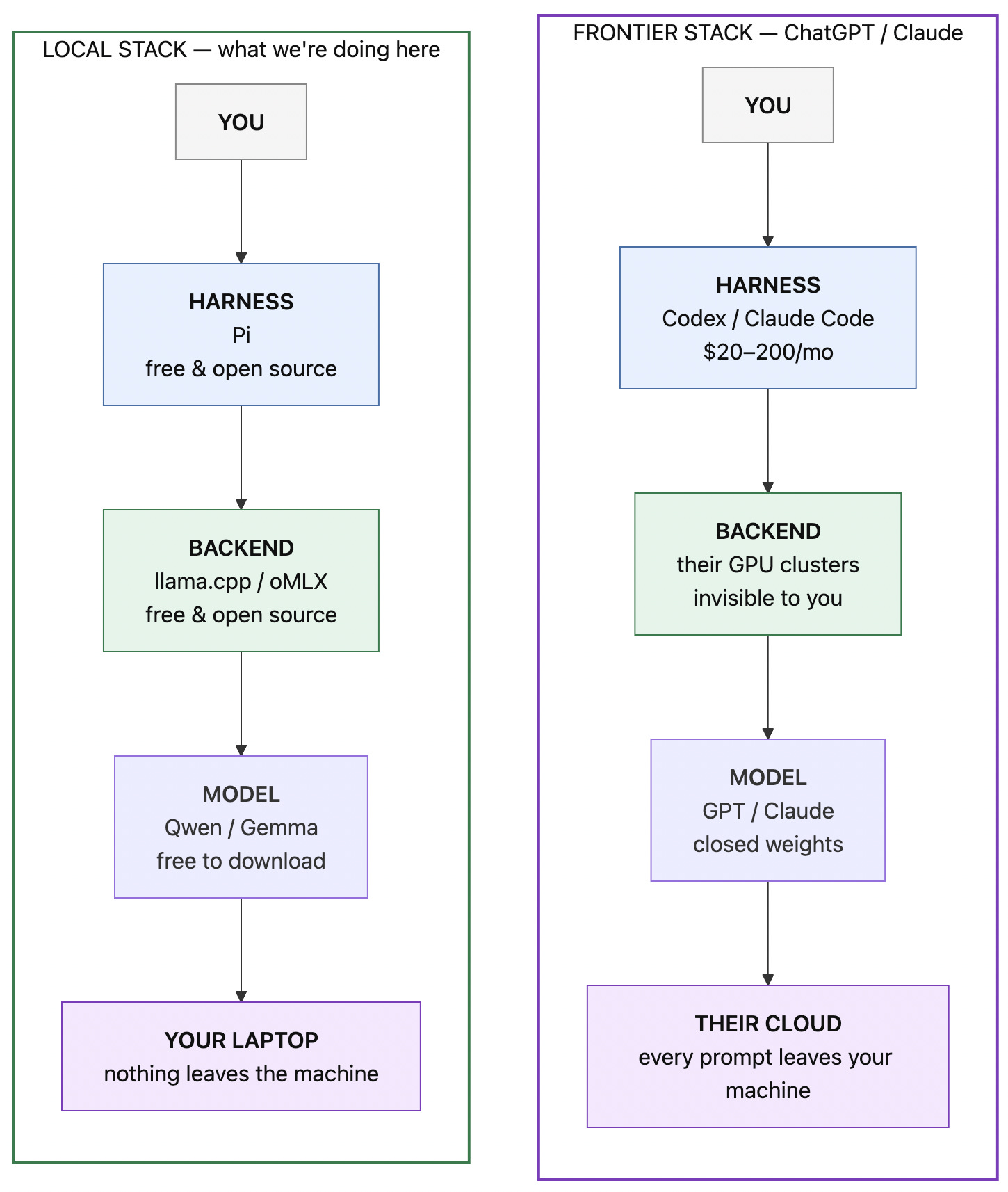
Local AI has the same structure as that of the big frontier AI, but at a very small scale. The key difference lies in the ownership of the model & your personal data. Of course one of the tradeoffs here is that the frontier models are gigantic in size and therefore will always be better in terms of quality and capability.
minimal-ai: a wrapper that connects all of this together
So I built a janky espresso machine to automate some of the work that goes into making my latte at home.
minimal-ai is a CLI that does all of the above automatically. You install it, run it, pick a model, and you’re in a coding session with a local model.
minimal-aiWhat does it do? It chains together the right tools & config to be able to run a local model quickly, in 3 steps.
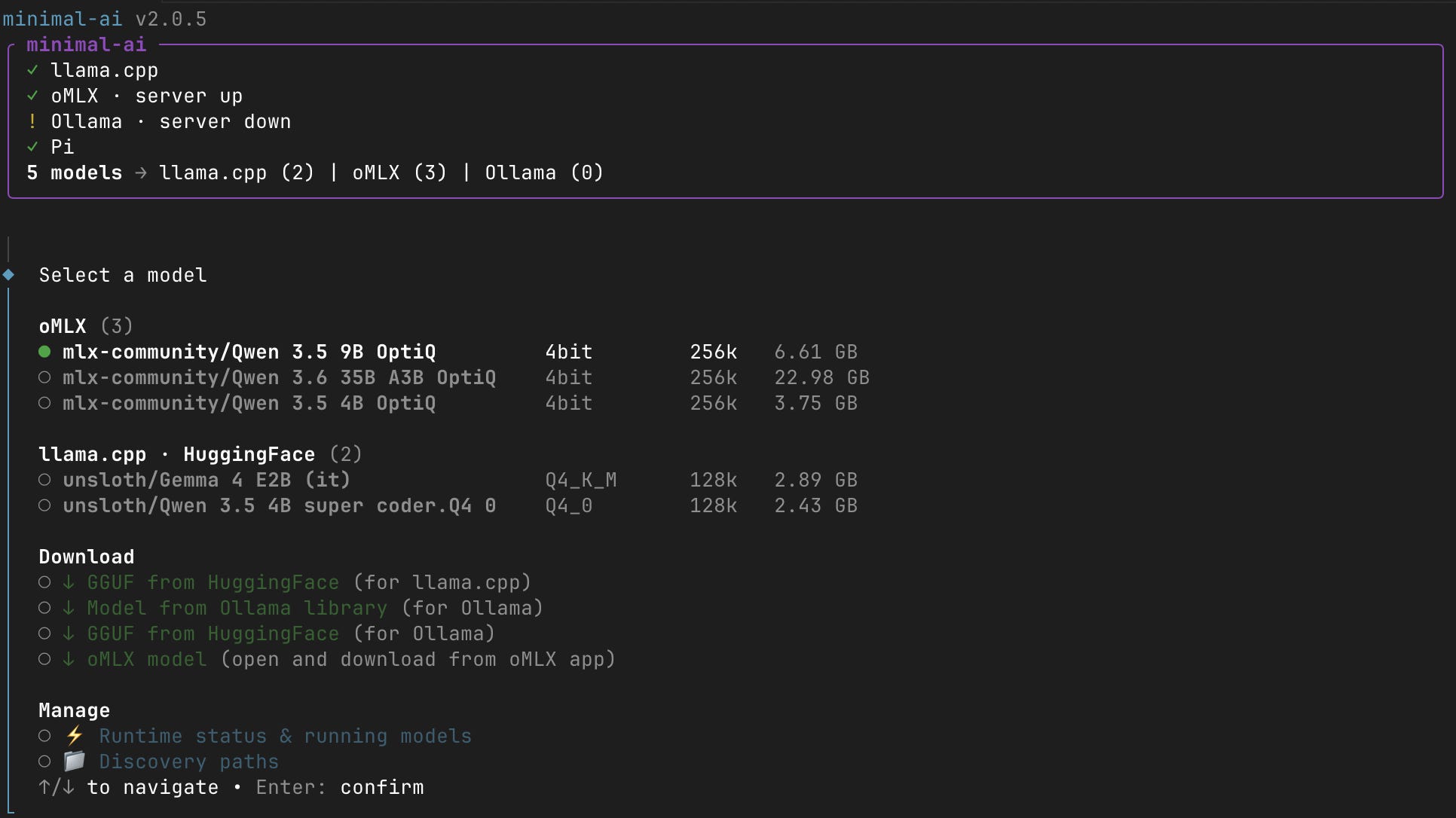
1. Pick a model. minimal-ai scans your machine for models you already have and puts them all in one list. If you don't have one, then you can download it straight from HuggingFace.
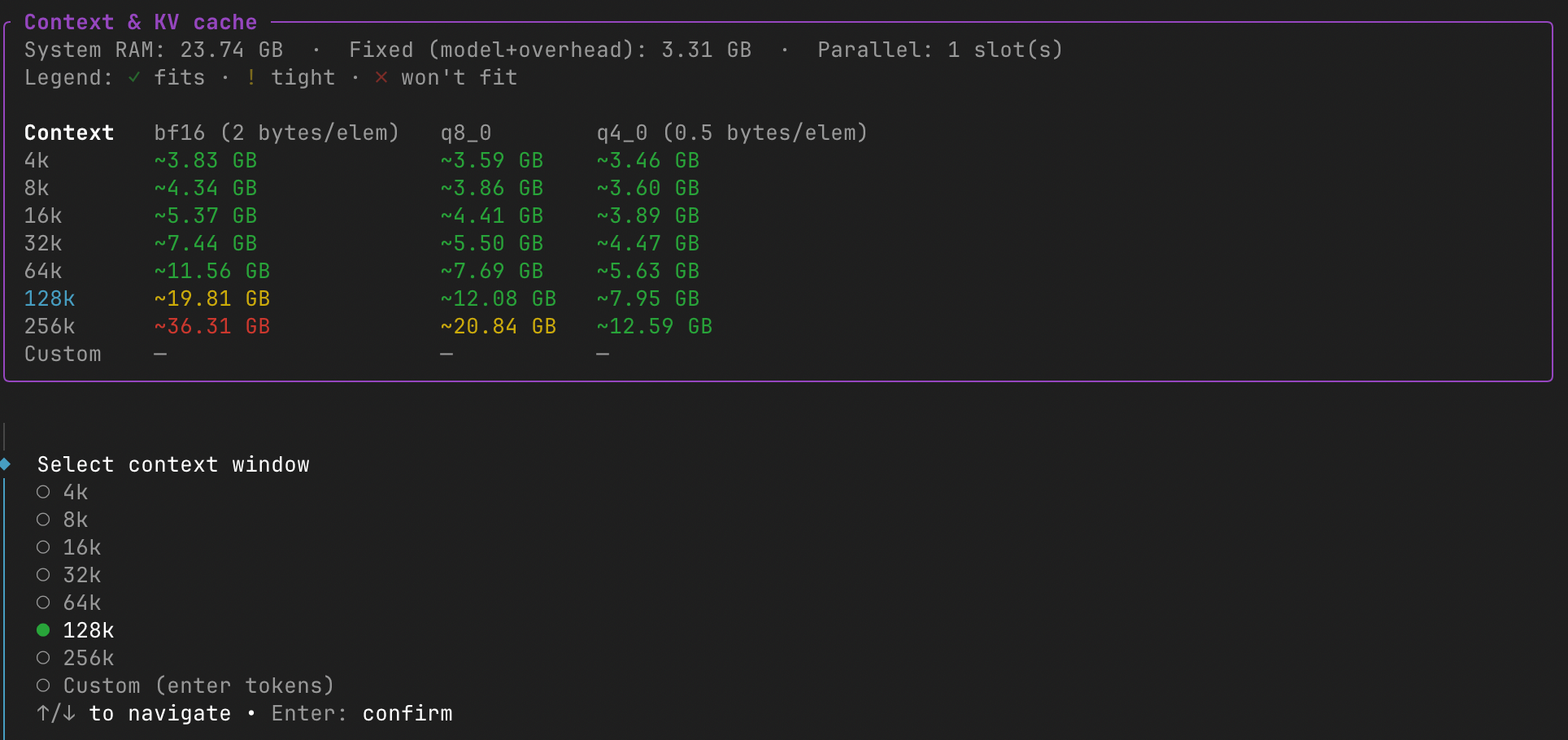
2. Configure the model serving. This is everything you DON’T have to think about with ChatGPT or Claude, but HAVE to with local models. Broadly speaking, you need to set up a few flags to ensure the model can run on your available RAM and at the level of performance you need:
Context — how much the model can hold in its head at once. More context = more memory.
Cache — the running memory of the conversation. You can quantize it (bf16 → q8_0 → q4_0) to trade a bit of quality for a lot of memory.
Sampling — how creative vs. predictable the output is.
Extras — things like vision (image inputs) and MTP (multi-token prediction, a speed trick newer models support).
Every one of these pushes on three things: memory, quality, and speed. minimal-ai walks you through each one with a plain-language hint, and shows you a live heatmap of context size × cache type against your actual RAM, so you can see the tradeoffs before you save. It also auto-detects special models (MTP, QAT) and applies the right flags for you.
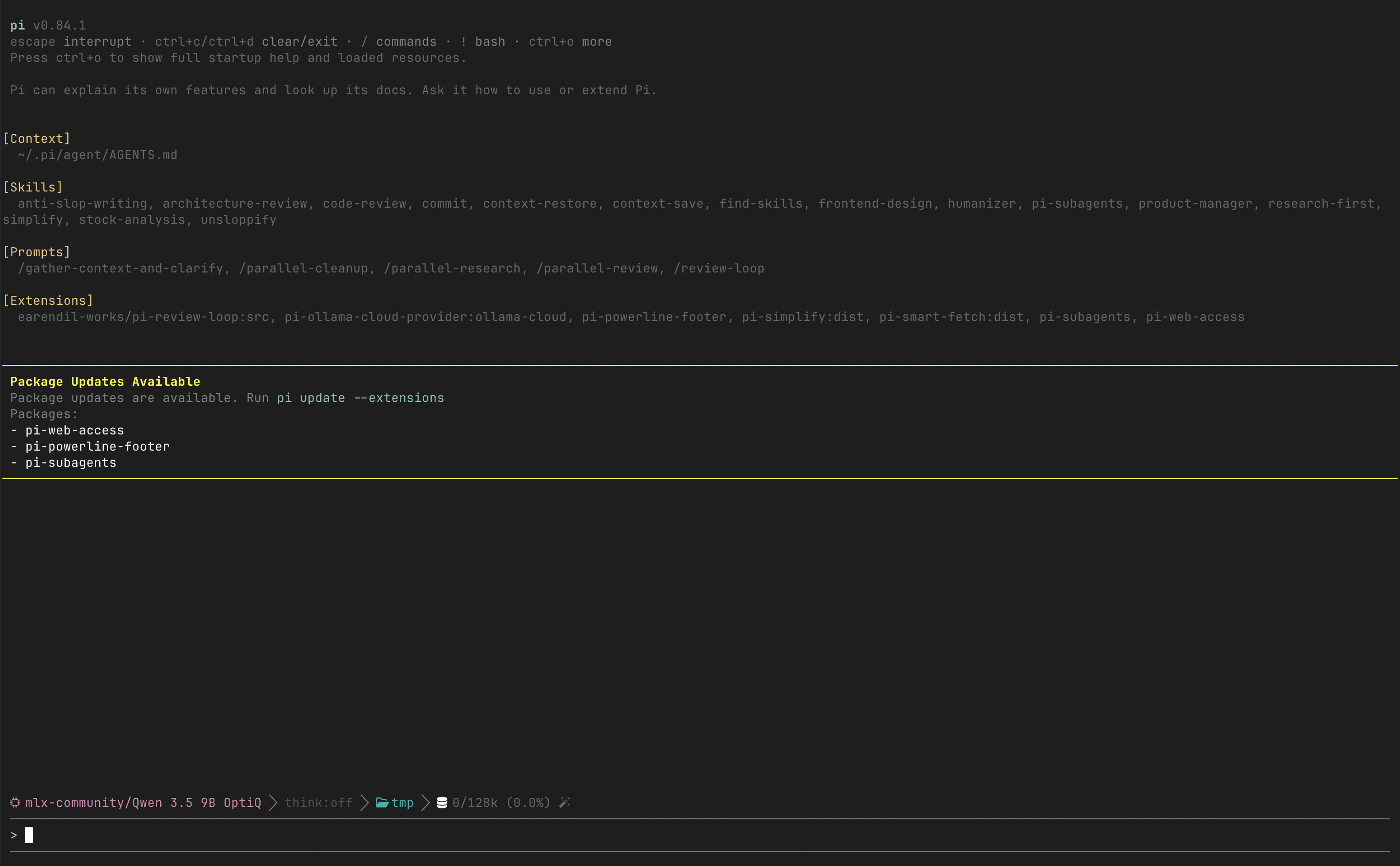
3. Chat. It starts the server, wires the model into Pi, and drops you into a coding session. When you quit, it stops the server and frees the memory.
The inference backends it chains together:
llama.cpp — the engine the whole local AI ecosystem is built on, and minimal-ai manages the runtime for you.
oMLX — an MLX-native server built for Apple Silicon. It’s the fastest way to run models on a Mac.
Ollama — the most popular local model backend, which I don’t use much but kept in because they’re always quick to support new model tech, and a lot of people already have it installed.
Model source: HuggingFace. Ollama & oMLX manage their own downloads, so the tool supports those paths as well.
minimal-ai is a wrapper. It’s not an inference engine or a model format or a coding agent. It’s a layer on top of other people’s work:
llama.cpp — the inference engine for GGUF models. The foundation of the entire local AI ecosystem.
oMLX — Jun Kim’s MLX inference server for Apple Silicon. The tiered KV cache is a genuine innovation.
Pi — my daily driver coding agent. Minimal, fast, works great with local models.
LM Studio and HuggingFace — model discovery and download. minimal-ai scans both.
Ollama — the simplest way to pull and run models. minimal-ai respects your existing Ollama setup.
What’s next
minimal-ai solves the setup problem for local AI models. The next problem is making local models useful and trustworthy. Two directions I’m thinking about:
Evals & safeguards. Small local models hallucinate more and break in ways frontier models don’t. Before I trust them with anything real, I want proper benchmarking and guardrails in place — promptfoo-style evals, and improving the prompts themselves so the model accurately achieves it’s specified goals.
Combining traditional ML with LLMs. I have some ideas around proactive agents, where plain Python ML code does 80% of the job and the LLM only handles what it’s actually good at — language. This should be massively cheaper than LLM-only workflows. (For now I don’t believe in agent loops for everything, just because of the wastefulness of it all.)
Try it
# Install
curl -fsSL https://raw.githubusercontent.com/eeshansrivastava89/minimal-ai/main/install.sh | bash

# Run
minimal-ai
This is a personal project and I’ve only tested it on Mac. It’s open source on GitHub. If you hit bugs, file an issue. If you want to extend it to Linux or Windows, I’m open to contributions.
No telemetry, not selling anything. Just a convenience tool I wanted to share.
This is part of my Local AI series. Previous posts: #1, #2, #3, #4, #5.