Hey there, I’m Eeshan. I write about local AI, data science, and building real projects with agentic tools, with a bias toward staying practical and keeping a level head through the hype cycles.
You can also find my live projects at eeshans.com.
This article is part of my local AI series, where I try to make sense of the easiest and best ways to run local AI models on your laptop.
Local AI Series #1: It’s time for the regular person to start testing local AI models
Local AI Series #2: The Regular Person’s Guide to Running AI on Your Laptop
In my last post, I showed the easiest way to run a local AI model on your laptop: install LM Studio, download a Gemma 4 or Qwen 3.6 model that fits in your laptop’s memory, load it inside LM Studio, and start interacting with an AI model that runs on your own machine.
That was level 1: can this model chat, summarize, rewrite, and help with everyday conversations?
Now we move to level 2: can this model build projects using agentic coding tools? That is also my primary use case, since agentic coding tools show up in a lot of projects at work and for personal use.
Unlike working with ChatGPT or Claude, where you can usually just pick the latest model and move on, local AI still requires a bit of hit and trial on your own laptop. There are a ton of scientific benchmarks1 out there, which most people don't understand, and we are not going to rerun them. Also, the performance of a local AI model depends on the right combination of model + your machine + some unavoidable technical setup (inference server2, coding harness3 etc.).
To try out something different, I borrowed an idea I came across online - credit to folks like @leftcurvedev_ and Simon Willison among others for the inspiration. The core concept is to ask the model to create a visual artifact, like an animation, under very tight constraints. It is a surprisingly good test because the model has to get a lot of things right at once - math, layout, physics, styling, animation, performance, and taste. This is the type of coding humans probably never do since it's too challenging for us.

They say a picture is worth a thousand words. In this case, it’s definitely worth a thousand lines of code.
TL;DR
The last post showed how to get a local model running using LM Studio. This post takes the next step to test them out on challenging coding tasks.
Instead of relying on abstract technical benchmarks, visual coding prompts make it easy to subjectively assess and compare output quality of different models.
I tested four visual prompts across different local models, inference backends, and coding harnesses on my M4 Pro MacBook with 48GB RAM.
Qwen 3.6 27B dense model produced the highest quality outputs, but Qwen 3.6 35B A3B was the better balance between speed and quality.
GPT 5.5 still beat all the local models quite easily. But that’s the tradeoff, can you be happy with “good enough” quality in exchange for free, private and on-device AI.
Let’s get straight to what I tested and see the results. Every model was tasked to work on four visual prompts - Sakura Tree, Solar System, Sunset at the Ocean, and Wildflower Meadow - and then compared side by side.
What I tested
Here is a compact version of the setup behind the videos:
Test machine: MacBook Pro, Apple M4 Pro, 48GB RAM
Output: a working visual HTML animation
Full prompt text is included at the end for anyone who wants to rerun the tests.
This benchmark had four possible dimensions:
4 prompts: Sakura Tree, Solar System, Sunset at the Ocean, Wildflower Meadow
4 local models: Qwen 3.6 27B (base), Qwen 3.6 27B (MTP)4, Gemma 4 26B A4B, Qwen 3.6 35B A3B
3 inference backends: LM Studio Server, oMLX, llama.cpp
3 coding harnesses: LM Studio, OpenCode, Pi
In theory, that could turn into 144 possible runs before even counting model quantizations, KV cache settings, temperature, and other backend flags. You can look these technical details up if you’re interested. After some tinkering, the final runs mostly used Pi as the coding harness and llama.cpp as the backend.
Results of the benchmark
Sakura Tree
This one was directly copied from one of the @leftcurvedev_ prompts. It appealed to me from an aesthetic point of view, but I also knew it would be one of the hardest challenges for the models.
What this prompt tests: organic shapes, branch structure, density of flowers, falling petals, and whether the model can make something that looks delicate and dreamy.
Verdict: Qwen 3.6 27B (base)
Qwen 3.6 27B (base) was the clear winner in these runs. It got the overall composition, background, blossom density, and softness right. The MTP version was pretty, but the petals were flickering like light bulbs. Qwen 3.6 35B A3B had an interesting painterly look, but the trunk and canopy were weird, and again there was a lot of flickering. Gemma 4 understood the basic prompt, but the result was much more sparse and plain.
Solar System
This prompt is less about aesthetics and more about spatial reasoning. The model has to keep all the planets visible, preserve some sense of orbital distance, avoid letting the Sun swallow the inner planets, and make the whole thing render as an animation. Overall, this was not a hard test, and most models produced a decent output.
Verdict: Qwen 3.6 27B (base)
Qwen 3.6 27B (base) was again the best overall because it produced the most polished and complete scene. Qwen 3.6 35B A3B was also very solid here, probably the closest second. Gemma 4 had a nice 3D feel, but the composition was less controlled and one planet gets comically huge. The MTP version of Qwen 3.6 27B was accurate, but the planets were moving too slowly.
Sunset at the Ocean
This one tests taste more than pure geometry. The point was to see whether the model could handle color gradients, horizon placement, water, reflection, and motion.
Verdict: Qwen 3.6 27B (base)
Qwen 3.6 27B (base) again had the best balance of realism and visual polish. The water and reflection were much better than the others. The MTP version was good, but the reflection felt more artificial. Qwen 3.6 35B A3B made a nice stylized sunset with good waves, but the sun positioning could have been better. Gemma 4 was the weakest here because the horizon and water split felt too simple.
Wildflower Meadow
This prompt is a good test for controlled randomness. A meadow should have depth, flower variation, insects, motion, and a natural density.
Verdict: No clear winner.
This was close and there was not a clear winner. Qwen 3.6 27B (base) again had the best overall balance. It had enough flowers, insects, depth, and atmosphere without becoming chaotic. The MTP version had the most energy and detail, but it became a bit too toy-like. Either one would be reasonable here. Qwen 3.6 35B A3B was good and had a nice sun, but it was less rich in details. Gemma 4 was too sparse and simple compared to the others.
Results Summary
Here are the very subjective quality rankings across the four prompts:
Sakura Tree: Qwen 3.6 27B (base) > Qwen 3.6 27B (MTP) > Qwen 3.6 35B A3B > Gemma 4 26B A4B
Solar System: Qwen 3.6 27B (base) > Qwen 3.6 35B A3B > Gemma 4 26B A4B > Qwen 3.6 27B (MTP)
Sunset at the Ocean: Qwen 3.6 27B (base) > Qwen 3.6 27B (MTP) > Qwen 3.6 35B A3B > Gemma 4 26B A4B
Wildflower Meadow: Qwen 3.6 27B (base) > Qwen 3.6 27B (MTP) > Qwen 3.6 35B A3B > Gemma 4 26B A4B
So Qwen 3.6 27B (base) was the clear visual-quality winner in these runs, but a big caveat is that this model runs too slow. For daily use, the practical speed of the model matters too: how fast it can process the prompt and produce the code. Below would be a rough speed ranking from fastest to slowest:
Qwen 3.6 35B A3B > Gemma 4 26B A4B > Qwen 3.6 27B (MTP) > Qwen 3.6 27B (base)
Any of these models could work for daily local work, but the best balance of speed and quality for me right now is Qwen 3.6 35B A3B.
Testing against the heavyweight
Just for fun, I also tested the same prompts against the latest & greatest in frontier AI - GPT 5.5. And as expected, GPT 5.5 was better on every prompt in pure output quality, and obviously in speed as well. This is especially obvious with the Sakura Tree and Wildflower Meadow, where the GPT result is orders of magnitude better.
There’s a reason why the local models will likely never beat the frontier models: GPT and Claude are cloud models, powered by enormous data centers, the latest NVIDIA chips, and unimaginable monetary funding. Local AI models are very small, and heavily constrained by the hardware you own. Unless you are a proud owner of a data center, or have a $10-$20K GPU rig lying around, you’re probably just like me, running these on a modern Mac or Windows laptop.
There were also a few other models from the testing that did not make it into the final comparison. Gemma 4 31B produced one very high quality result, but did not reliably fit in 48GB of memory. Gemma 4 E4B and Qwen 3.5 9B are both useful starter models for smaller machines and everyday use, but they were not strong enough for this kind of agentic coding benchmark.
Try it yourself
If you want to try this yourself, there are two paths.
The simple path is to do everything inside LM Studio. Download a model, load it, enable the local server / coding tools you need, and ask it to generate the visual artifact from one of the prompts. That is the best starting point if you are new to local models.
The more technical (and potentially optimal) path is:
Download the model in LM Studio (or oMLX)
Use an inference backend: LM Studio, oMLX, or llama.cpp if you are comfortable with some command-line setup for the latter.
Run the prompt through a solid coding harness: Pi or OpenCode
For these runs, I built a small workbench: local-llm-visual-benchmark. Feel free to check out the live gallery for the full collection of benchmark runs.
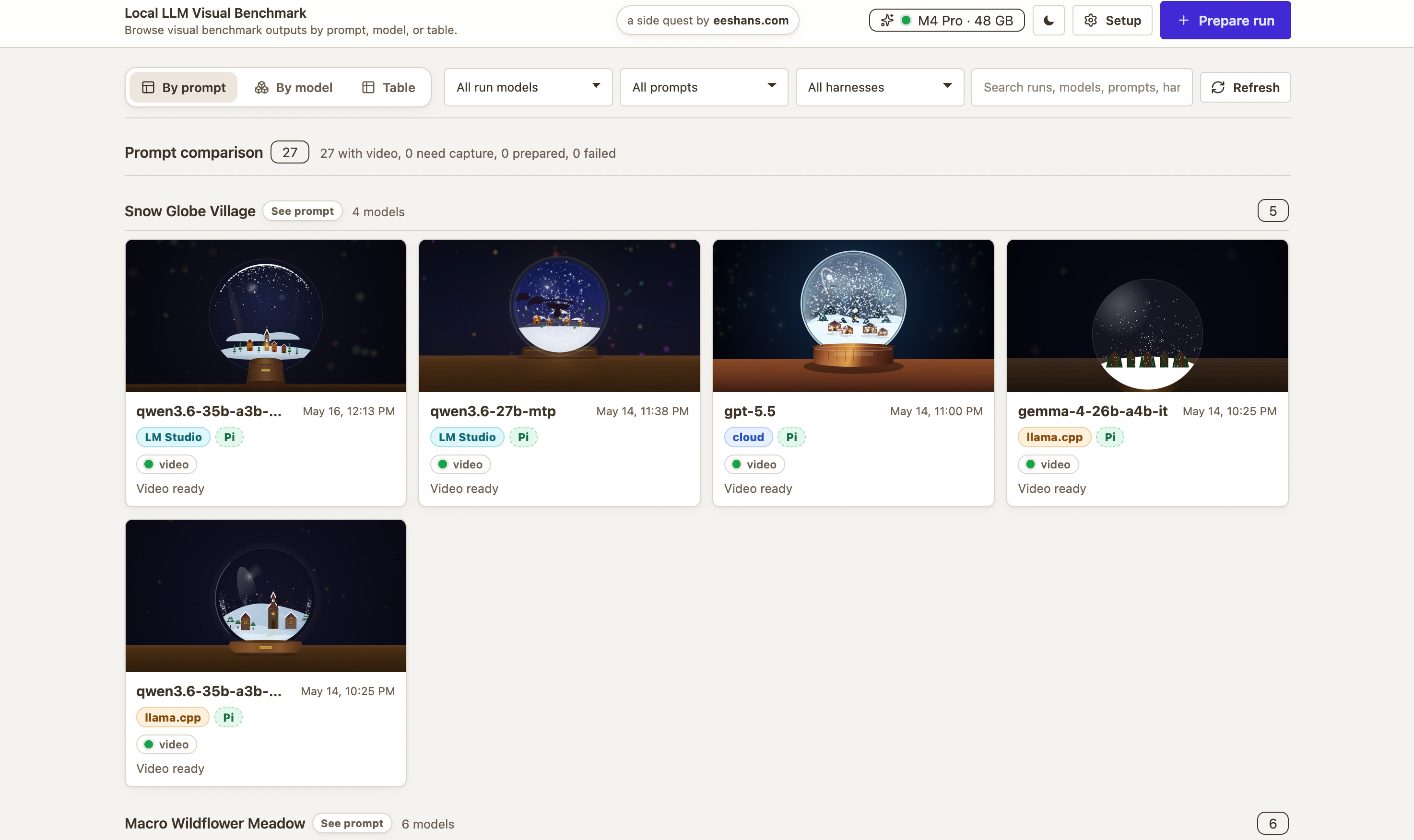
The workflow is to use LM Studio / oMLX for model management, and then the app helps you prepare runs, capture preview media, and compare outputs by prompt or model. There is also a small local-llm helper CLI in the repo for the llama.cpp + Pi/OpenCode setup, but you do not need that to start. Feel free to try this and customize to your own needs.
I would love to see people try these prompts on their own setup and share the results. My guess is that different machines, quantizations, harnesses, and patience levels will produce very different “best” outputs.
The payoff for all this benchmarking is not to prove that a local model is better than GPT or Claude. It probably never will be. But the practical goal is simpler: which local models are good enough for daily use, and eventually for replacing 80% of cloud usage for free, privately, on-device?
These local models are maybe 40-50% of the way there already ... right now. I’m hoping to get to that 80% mark hopefully by the end of this year.
Prompts
Sakura Tree
Animate a dreamy Japanese cherry blossom tree in full bloom during a gentle petal storm. The complete tree must fit comfortably inside the viewport at all common screen sizes: the full crown, outer blossoms, side branches, trunk, and base must stay visible with at least 8-10% empty margin from the top and left/right edges. Compose the tree as a centered full-body subject, not a cropped close-up. Keep the trunk base near the lower part of the canvas, but do not let it extend below the viewport. The crown should use no more than about 80% of the canvas width and 70% of the canvas height, so no branches or blossoms are clipped. Use dark, elegant lines for the trunk and branches, with pink-white blossoms throughout. Thousands of delicate pink and white petals should fall continuously with realistic physics: subtle rotation, wind-curved paths, varied speeds, and occasional small gusts. Add a soft pastel sky gradient from light pink to lavender, distant misty mountains, a few petals accumulating on the ground, and subtle sunlight from the top right. The scene should feel poetic and serene, loop naturally, and run in real time. Use a full-page canvas and no external libraries.
Build and edit the file in small chunks instead of writing a monolith in one go, so it’s easier for you to modify and debug components if anything doesn’t work as expected.
Solar System
Build an HTML animation of the solar system with the Sun at the center and all planets orbiting around it. Make the scene as realistic as practical while keeping all planets visible: the Sun should glow clearly but must not be so large that it hides or overwhelms Mercury, Venus, Earth, or Mars. Preserve the relative scale of orbital distances, use accurate orbital shapes, realistic planet colors, and visible rings where appropriate. Show the system from roughly a 30-degree viewing angle rather than directly overhead. Include as many realistic visual details as possible while keeping the animation smooth.
Make sure the full solar system composition fits cleanly within the browser viewport without cropping important planets or orbital paths.
Build and edit the file in small chunks instead of writing a monolith in one go, so it’s easier for you to modify and debug components if anything doesn’t work as expected.
Sunset Ocean
Create a full-screen animated ocean sunset viewed from low above the water, looking toward the horizon. The sun should be partially visible, with about one third of the disk above the horizon and two thirds below it, so the scene feels like late golden hour rather than midday. Use a warm palette of amber, peach, coral, rose, lavender, and deep blue shadows. The ocean should have broad rolling waves moving toward the viewer, with smaller ripples layered on top and bright reflected highlights forming a shimmering path from the sun to the foreground.
Add soft volumetric-looking sun rays breaking through thin clouds, but keep them subtle and elegant. Clouds should be stretched horizontally near the horizon, with glowing edges and darker undersides. The water should show changing reflections, foam accents on a few wave crests, and gentle color shifts from warm near the sun to cooler blue-violet in the foreground. Keep the composition clean: one horizon line, one sun, a readable wave rhythm, and no cluttered objects. The animation should loop naturally, run smoothly, adapt to the browser viewport, and keep the horizon, sun, and wave composition visible without awkward cropping.
Keep the implementation performant while maximizing creativity. Use no external libraries.
Build and edit the file in small chunks instead of writing a monolith in one go, so it’s easier for you to modify and debug components if anything doesn’t work as expected.
Wildflower Meadow
Create a full-screen animated close-up meadow scene on a bright breezy day, viewed from just above flower height as if the camera is inside a small patch of wildflowers. Keep the composition intimate and readable: show about five to seven large foreground flowers with detailed petals, stems, leaves, and pollen centers, rather than a huge field of tiny flowers. Around them, animate a few butterflies and bees moving through the scene. The insects should be large enough to see details: butterfly wing patterns, antennae, soft body shapes, bee stripes, tiny wings, and curved flight paths.
Use a vivid imaginative color palette with saturated flower colors, fresh greens, warm sunlight, and playful accents. The model may choose the flower and butterfly colors freely, but the scene should feel joyful, lush, and eye-catching as a gallery thumbnail. Add wind motion: flower stems should sway gently, petals should flutter, leaves should tilt, and insects should adjust their flight as if riding small gusts. Include a softly blurred background with hints of more flowers and sky, but keep the foreground flowers and insects as the clear focus.
Keep the implementation performant while maximizing creativity. The animation should loop naturally, run smoothly, adapt to the browser viewport, and keep the foreground flowers and insects visible without cropping. Use a full-page canvas or SVG and no external libraries.
Build and edit the file in small chunks instead of writing a monolith in one go, so it’s easier for you to modify and debug components if anything doesn’t work as expected.
Examples of release-card benchmarks include MMLU or MMLU-Pro for general knowledge, GPQA Diamond for hard science reasoning, AIME or MATH-500 for math, SWE-bench Verified and LiveCodeBench for coding, MMMU for multimodal reasoning, and whatever newer agentic benchmark is fashionable that week.
An inference server is the process that loads a model and exposes it through an API that another app can call. In this article, LM Studio means the local LM Studio server with OpenAI/Anthropic-compatible endpoints, oMLX means a macOS/MLX server optimized for Apple Silicon workflows, and llama.cpp means the GGUF-focused local inference stack with llama-server for OpenAI-compatible local serving. Sources: LM Studio developer docs, oMLX, llama.cpp server docs.
I am using "coding harness" to mean the agentic coding interface around the model: the tool that takes a prompt, writes files, runs commands, inspects results, and iterates. Pi and OpenCode are examples. Sources: Pi custom models docs, OpenCode
MTP stands for Multi-Token Prediction. It is a speculative decoding approach where a model with native MTP support can propose future tokens without needing a separate draft model. Support depends on the model and inference framework, so the result here should be read as “the MTP backend path on my machine,” not as a universal speed claim. Sources: vLLM MTP docs, Qwen3.6-27B model card.